1. Installation
-
Start → Add or Remove Programs
-
Uninstall LTspice
-
[ needs admin password ]
-
-
Download and run the installer program from LTspice download
-
Select “Install for Everybody (all users)”
-
[ needs admin password ]
-
2. Custom colors and shortcuts
The default colors in LTspice are quite poor, especialy for the waveform viewer. It is possible to change the colors from within the program, but there is no way to load a color theme from the GUI.
The colors below are combined from a few different sources that describe choosing good sets of colors for distinguishing amongst a set (like waveforms) that still perform well for the most common forms of color blindness.
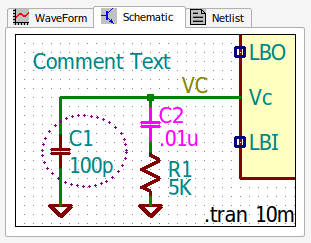
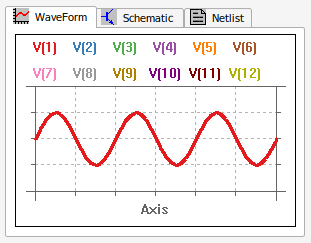
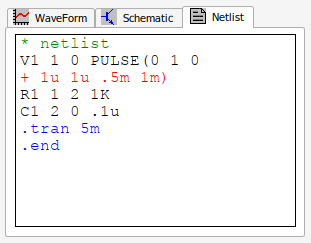
| This will overwrite ALL of your settings! |
-
Download the settings file: LTspice.ini (right click and "Save file as…")
-
Navigate to
C:\Users\<username>\AppData\Roaming\(AppDatais a hidden folder) -
Replace the downloaded file with the
LTspice.iniin that folder.
2.1. Shortcuts
These are already part of the above LTspice.ini file.
The custom keyboard shortcuts are originally from LTspice Hot Keys from LTwiki.org and for the older version LTspiceXVII. They have been ported to the new version (currently 26).
It is useful to look over the handout that shows how they are designed:
-
Reference and instructions: LTspice-hotkeys.pdf
This file can be downloaded and used to change only the shortcuts: ltspice-shortcuts.txt
-
PDF version of the help: LTspiceHelpXVII.pdf
-
batch file for lab computers: LTspice-kbd.bat
-
There is even a video showing how to add these on your own machine:
HOWTO add LTspice custom shortcuts (For older version)
2.2. Colors
These are already part of the above LTspice.ini file.
- To use these colors without affecting other settings
-
-
Use a text editor to view the settings file that LTspice uses on your computer, it is found at:
C:\Users\<username>\AppData\Roaming\LTspice.ini -
Replace the
[Colors]section with the following:
-
[Colors]
Grid=11842740
InActiveAxis=9868950
WaveColor0=16777215
WaveColor1=6579300
WaveColor2=1841892
WaveColor3=12090935
WaveColor4=4894285
WaveColor5=10702488
WaveColor6=32767
WaveColor7=2643622
WaveColor8=12550647
WaveColor9=10066329
WaveColor10=32943
WaveColor11=8388736
WaveColor12=128
WaveColor13=44975
SchematicColor0=33792
SchematicColor1=33792
SchematicColor2=132
SchematicColor3=132
SchematicColor4=12779519
SchematicColor5=8684544
SchematicColor6=33924
SchematicColor7=0
SchematicColor8=8684544
SchematicColor9=8650752
SchematicColor10=16711935
SchematicColor11=8684676
SchematicColor12=16777215
SchematicColor13=8650884
NetlistNormalTextColor=0
NetlistCommentTextColor=32768
NetlistDotcmdTextColor=16711680
NetlistBackgroundColor=16777215
ContinuationLineColor=255|
The colors are the 24-bit (3-byte) hex values but LTspice saves them as integers. For example:
|
TODO: tool and strategy for color selection.
For now, these are the references used to design the waveform colors. The schematic colors are KiCad-like.