Calling all functions
1. avr-gcc function calls
Brief review of day10 content.
-
Open the GCC Wiki page for
avr-gcc
1.1. Register Layout
- R0
-
When the compiler wants to use a register for some temporary purpose, it first uses R0.
- R1
-
Assumed to always be zero when read.
1.1.1. Call-Saved Registers
R2 — R17, R28, R29
Put it back the way you found it after you’re finished.
-
Save the value of the affected register (to the stack:
push r5) -
… do your thing …
-
Restore the value of the affected register (from the stack:
pop r5) -
Then and only then can you
retorreti
1.1.2. Call-Used Registers
R18 — R27, R30, R31
The compiler is under no obligation whatsoever to remember what these registers held before writing to them.
| Therefore an interrupt service routine (ISR) must save and restore these registers, if used. |
Also note that the pair of registers R31 : R30 is known as Z on the AVR and has sometimes special uses.
1.2. (Stack) Frame Layout
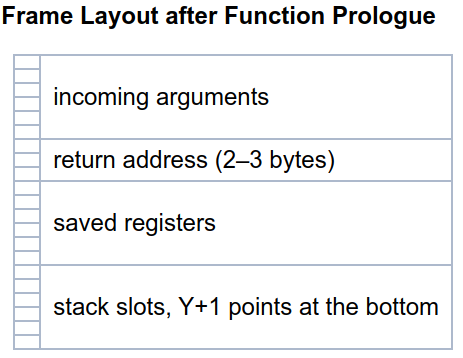
avr-gcc decides which specific registers to use near the end of the compilation process, hence this talk about “pseudo registers” — it’s a CS thing.
Notice how R29 : R28 are assigned — i.e. don’t use these registers!
2. Example watching avr-gcc do its thing
avrgcc-functions.ino using the Arduino IDE/*
* ECE 422
* Calling functions
*/
/*
* Global variables placed in SRAMj
*/
volatile char a, b, c, d;
volatile int out; // holds function return values
/*
* The "__attribute__ ((noinline))" business is GCC-specific syntax
* saying to NOT optimize by inlining the code at the point of use.
* We *want* to see the rcall / ret happening!
*
* https://gcc.gnu.org/onlinedocs/gcc/Function-Attributes.html
*/
char __attribute__ ((noinline)) fOne(char first) {
return first + 1;
}
char __attribute__ ((noinline)) fTwo(char first, char second) {
return first + second + 1;
}
char __attribute__ ((noinline)) fThree(char first, char second, char third) {
return first + second + third + 1;
}
char __attribute__ ((noinline)) fFour(char first, char second, char third, char fourth) {
return first + second + third + fourth + 1;
}
void setup() {
pinMode(LED_BUILTIN, OUTPUT);
a = 2;
b = 4;
c = 16;
d = 64;
}
// the loop function runs over and over again forever
void loop() {
digitalWrite(LED_BUILTIN, HIGH); // turn the LED on (HIGH is the voltage level)
delay(1000); // wait for a second
digitalWrite(LED_BUILTIN, LOW); // turn the LED off by making the voltage LOW
delay(1000); // wait for a second
// call function with one 8b argument
out = fOne(a);
// call function with two 8b arguments
out = fTwo(a, b);
// call function with three 8b arguments
out = fThree(a, b, c);
// call function with four 8b arguments
out = fFour(a, b, c, d);
}-
Verify/Compile this sketch
-
Sketch → Export compiled Binary
-
Open the
avrgcc-functions.ino.lstfile in a worth text editor and turn on syntax highlighting.
SAVE-AS so you are working on a copy of the file!
By now, you are somewhat familiar with reading assembler syntax.
The .lst file syntax is a combination of comments, notes, information, and the assembly code that GCC compiled to from the source C/C++ code.
In the Arduino IDE, turn on Verbose output to see the commands that generate the listing file.
avr-objdump
3. Interrupt Service Routines
Introduction to avr-libc’s interrupt handling
It’s nearly impossible to find compilers that agree on how to handle interrupt code.
Even though we are presently using assembly for programming our AVR-based ATtiny85, it is useful to be aware of how a C/C++ compiler deals with interrupts.
Open up the AVR libc documentation about interrupts:
https://www.nongnu.org/avr-libc/user-manual/group__avr__interrupts.html
4. References
GCC special attributes https://gcc.gnu.org/onlinedocs/gcc/Function-Attributes.html
Jaywalking Around the Compiler — Jason Sachs, EmbeddedRelated.com. Mixing C and assembly requires understanding the compiler’s assumptions it uses.